Discover how your practice can turn statements into payments by implementing a billing process that includes effective payment options.
A patient statement is intended to be one of the final steps in a clean revenue cycle, but in reality, the statement often becomes the start of a new, slower process. A balance that should be settled in days can extend into weeks or months, not because patients refuse to pay, but because the patient's roadmap from receiving their statement to paying their bill was full of hurdles. This is where offering payment options becomes important.
Healthcare has been placing more cost responsibility on patients for years. Higher deductibles, co-insurance, and self-pay balances mean that a larger share of revenue depends on consumer-like collection behavior. This has changed what good billing looks like. It is no longer enough to send accurate patient statements. You also need to offer payment options that match how people typically pay. When patients have only one or two inconvenient payment methods, the patient statement becomes a reminder, not a transaction.
Offering multiple convenient payment options speeds up payment by reducing decision fatigue. It also enhances the patient experience by acknowledging that different patients prefer different channels. Patients may choose to pay online quickly, mail a check, use a financing plan, or pay immediately if a QR code directs them to a secure portal. Others want automated payments.
Modern billing and payment technology is what takes these options from something nice to something that gives you an advantage. Technology can connect statement delivery to payment experiences and post transactions back to the patient account without manual effort. Here’s how your practice can convert statements into payments by using a billing process with six payment options.

Why Payment Choice Matters in Healthcare
Patients, like consumers, expect the same convenience in healthcare payments that they experience daily. Gone are the days when a mailed bill and a checkbook were enough for the majority of your patient base. People want to open a message, tap a link, authenticate quickly, and pay their bills. In healthcare, providers often ask patients to read complex medical and insurance terms, review multiple dates of service, and pay using methods that suit their habits. If the only options are to call during office hours or mail a payment, you are seemingly asking for delayed payments.
Payment choice matters so much because it helps reduce friction in three key ways:
1. It Reduces Delays Caused By Timing and Convenience
Many people pay when they have time, not when they receive a bill. A patient may intend to pay but only has time after work, on the weekend, or while on the train or bus. Payment options that are available anytime, from any device, allow them to do so.
2. It Reduces Confusion and Abandonment
If the patient has to search for account numbers, use a complicated portal, or guess what payment methods are accepted, the process is too weak. Each extra step increases abandonment. A simple payment workflow increases completion rates.
3. It Reduces Administrative Labor
When practices limit payment options, patients have more questions. Staff then spend time answering calls, taking card numbers over the phone, setting up manual payment arrangements, and correcting posting errors. Offering self-service options, paired with automation and integration, takes routine transactions away from staff while keeping visibility.
There is also the aspect of patient satisfaction. Billing is one of the most common points of contact patients have with a medical practice. A confusing and inconvenient patient payment experience can damage trust, even if the care quality was excellent. A clear statement and an easy payment method give the impression that the practice is well-run and respects patients’ time. Ultimately, the goal is to make the statement a point of contact that leads to a payment experience the patient is willing and able to use immediately.
6 Payment Options That Turn Statements Into Payments
To help convert statements into faster payments, consider implementing the following six payment options:
1. Pay Online From Any Device
What It Is: A secure online payment experience that works on desktop and mobile devices, preferably with an option that does not require the patient to create an account or remember a password for a one-time payment.
Why It Turns Statements Into Payments: Online payment options eliminate the biggest barriers: calling during office hours, mailing paper checks, and waiting for processing. Patients can pay as soon as they decide to act, whether that is at 11:00 PM on a Tuesday or while waiting in the school pickup line. When providers pair text or email notifications with a direct payment link, patients receive reminders to pay and can take action immediately.
How It Works:
- Patients receive a bill and/or a text or email notification with a secure link to the payment portal
- Patients are directed to a secure online payment portal
- The patient can easily identify the amount they owe
- The payment page is mobile-friendly and quick to load
- Patients can use common payment methods and receive a confirmation immediately
Benefit: When patients pay online, you reduce paper checks, reduce front-desk and billing office phone payments, and improve posting speed. The best outcomes occur when online payments update the correct patient account automatically, eliminating the need for staff to match transactions.
Tip for Success: Allow patients to pay without account registration. If your portal requires registration for every payer, you may not get the simplicity you want.
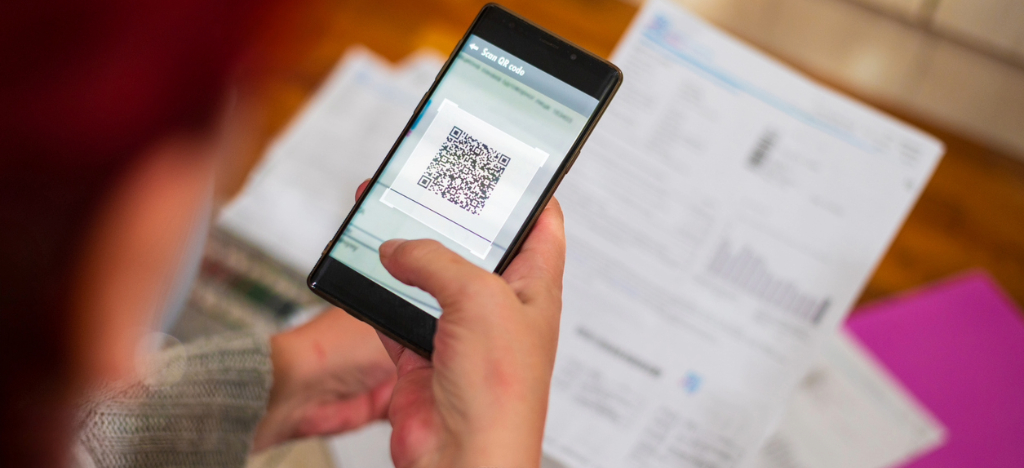
2. Paper Statements With QR Codes
What It Is: A traditional mailed statement that includes a QR code that patients can scan with a smartphone to access a secure payment portal.
Why It Turns Statements Into Payments: Many patients still prefer paper statements, either out of habit, for privacy reasons, or because paper appears more official. QR codes link physical mail to digital payment in seconds. This is one of the most effective payment options because it respects paper preferences.
How It Works:
- The QR code is large enough to scan easily and can be placed near the payment instructions
- A statement can include a short URL as a backup for patients who do not want to scan
- The payment portal allows patients to either sign in or use Guest Pay by entering the code printed on the mailed statement.
- The payment workflow is optimized for mobile, since the code was scanned using a phone
Benefit: QR codes can reduce patient calls about payment procedures or locating account information. They also encourage faster payments.
Tip for Success: Ensure that QR codes function on multiple mobile devices. A QR code that fails to scan every time will frustrate patients and increase phone inquiries.
3. Payment Plans
What It Is: Installment payment options that allow patients to pay larger balances over time, under clear terms and with predictable monthly amounts.
Why It Turns Statements Into Payments: For many patients, the issue is not their readiness to pay. It is financial reasons. If the only option is to pay the full balance, patients may wait until they figure out their finances. A payment plan turns a “not now” into a “yes” by making the decision manageable. Payment plans also reduce the likelihood of accounts aging into collections. The earlier a patient commits to a plan, the more likely the practice is to recover the full balance over time.
How It Works:
- The statement and online payment page clearly offer the option to enroll in a payment plan
- The plan terms are clear, including start date, payment timeline, and any fees that may apply
- Patients can apply without calling the office
- Your practice has controls for eligibility rules, such as a minimum balance and a maximum number of months
Benefit: Payment plans reduce the costs of negotiating other types of arrangements. Standardizing plans also improves consistency and reporting.
Tip for Success: Create a payment plan that aligns with your financial policy. If your policy allows balances above a set amount to be spread over a defined timeframe, include this in the workflow so staff and patients clearly understand it.

4. Scheduled and Recurring Payments
What It Is: The ability for patients to schedule a one-time future payment or set up recurring payments, often connected to a payment plan or ongoing balances.
Why It Turns Statements Into Payments: Many patients plan to pay after their paycheck date, during a certain time of the month, or around the time they pay other bills. Scheduled payments allow patients to act now and pay later without needing to return. Once it is set up, payments happen automatically. These types of payment options benefit patients managing chronic care or recurring therapy. It can also help families with multiple bills, where they need consistency.
How It Works:
- Patients can choose a date
- Your system sends confirmation and reminders
- Patients can update payment methods easily
- Your practice can see upcoming scheduled payments in reports
Benefit: Scheduled and recurring payments stabilize cash flow and reduce the number of delinquent accounts sent to collections.
Tip for Success: Provide clear controls for patients to manage their recurring payments. If a patient has to call to update an expired card, you will likely see several failures and an increase in call volume to the office.
5. Multiple Payment Methods (Card, ACH, Digital Wallets)
What It Is: Supporting a range of payment methods, including credit and debit cards, ACH or bank transfer, and digital wallets such as Apple Pay and Google Pay when available.
Why It Turns Statements Into Payments: People have strong preferences for how they pay. Some avoid credit cards, while some prefer debit cards. Some want to pay directly from a bank account. Many mobile users complete checkouts faster with digital wallets. If your portal forces a patient to use a method they do not want, you will lose some payments.
How It Works:
- The payment portal clearly shows accepted payment methods
- ACH is offered for patients who prefer bank payments or for higher balances
- Digital wallets are available for mobile-friendly experiences
- Receipts and confirmation are sent immediately and are easy to save
Benefit: Offering a variety of payment methods helps prevent abandonment and reduces processing issues. They also save staff time because fewer patients will call to ask, “Do you take credit cards?”
Tip for Success: Ensure your reconciliation process accurately identifies method types. If ACH and card payments do not settle the same, you need clear reporting to prevent guesswork.
6. Payments Integrated Directly With Billing Workflows
What It Is: Payments that automatically post back to patient accounts and sync with your billing system, instead of being stored in a separate payment tool that staff have to reconcile.
Why It Turns Statements Into Payments: This is the strategy that ensures the other five payment options function effectively. You can offer every payment channel you can think of. However, if staff must enter payments into the billing system, track transactions, and manually match reference numbers, the operational cost can quickly erase the benefit. Integration converts a payment from a single event into a full revenue cycle action. The patient pays, the account records the payment, the balance updates accordingly, and a confirmation receipt is sent.
How It Works:
- Payments post automatically with the correct information
- Partial payments and multiple encounters are handled accurately
- Refunds and adjustments have a controlled workflow
- Reporting shows payments by channel, location, and time period
Benefit: Integrated posting reduces manual entry, reduces mistakes, and improves the reliability of your A/R reporting.
Tip for Success: Before selecting a billing partner, understand your practice’s entire workflow. Integration that only covers part of your workflow will still leave your staff with manual work.

Turning Statements Into Action: How Technology Makes the Difference
Technology drives the transition from a statement-heavy workflow to a payment-centric workflow. In the past, the billing cycle was about printing, mailing, waiting, and processing. Today, technology allows communication and payment to occur almost simultaneously.
Here is how technology improves payment options when implemented properly:
Statements Are Not Static
A statement with a QR code and clear next steps, paired with text and email notifications that include a direct payment link, becomes a path to completion—not a passive piece of paper. Patients don’t have to guess what to do; they can act immediately.
Reminders and Follow-Ups Can Be Automated
Without automation, staff turn into the reminder system. With automation, you can send consistent reminders through approved texts and emails, without overwhelming staff or patients.
Payments Can Be Captured in the Channel Patients Prefer
A modern platform supports a mix of payment options and experiences that work across multiple devices. This reduces abandonment and supports faster resolution.
Back-Office Work Becomes Lighter
When payments post automatically and accounts update without any errors, staff will not have to spend time on entering transactions.
Platforms like BillFlash were created around multiple channels that adapt well to real patient behavior. For patients seeking self-service, BillFlash offers OnlinePay through PayWoot.com, including GuestPay, which enables quick payment with no sign-in required. BillFlash also delivers eBills via text and email, giving patients a direct link to pay as soon as a bill is ready.
For patients who use more traditional methods, BillFlash offers OfficePay. OfficePay supports walk-in, mail, cash, card, digital wallets, and phone payments—all processed through BillFlash.com.
This variety helps practices accommodate different payment preferences without requiring staff to manage multiple disconnected systems. BillFlash also offers PlanPay and AutoPay as automated payment options for patients who need structure and predictability. PlanPay handles scheduled payment plans, and AutoPay enables patients to pay bills automatically each time a new bill is sent.

Benefits for Healthcare Organizations
Implementing a comprehensive payment strategy with multiple payment options provides substantial benefits for healthcare organizations. By making it easier for patients to pay, providers can expect to see:
- Faster payments and improved days in A/R
- Lower statement and collection costs
- Reduced staff workload and increased efficiency
- Better patient satisfaction and trust
Patients remember billing experiences. They may not remember claim details, but they remember whether paying felt easy and respectful. Payment choice supports patient satisfaction. It lets someone handle a balance privately on their phone. It also lets someone on a fixed income commit to a plan without turning it into a negotiation. Payment choice allows patients who question card payments to use checking, and it lets those who prefer digital wallets pay with the method they use everywhere else. Trust improves when the statement is clear, and the payment path is simple. These are small details that add up to a modern experience.
Start Transforming Your Statements With BillFlash
Turning statements into payments is not about adding more work for your staff or using disconnected tools. It is about building a payment experience that patients can complete quickly, in the way they prefer. It is also about creating a process that posts and reconciles those payments with minimal manual effort. If you're ready to turn your statements into payments, modern billing and payment tools are the best solution. Implementing multiple payment options, backed by automated and integrated technology platforms, transforms patient statements into actionable revenue.
Are you ready to give patients the choices they expect and make life easier for your staff? Schedule a demo with BillFlash to see how our billing, payment, and collection software can help your healthcare organization turn statements into payments.